Keyword Research in 2026: From Building Lists to Describing Your Business
Two facts, both from Google.
First: a keyword in Google Ads can be a maximum of 80 characters and 10 words. Second: Google says the average AI Mode search is triple the length of a traditional search query.
Put those together and you might infer that something has quietly broken. You can’t write a keyword that represents the query somebody actually typed. Sometimes they didn’t type anything at all.
So if the thing you’re bidding on can no longer look like the thing people are searching, what is keyword research actually for now?
I wrote a long article about keyword research back in 2020 to try and summarize everything I’d learned about it in the previous decade or so, and I went back and reread it while writing this post. It was a strange experience. Some of it describes a system that doesn’t exist anymore. And one part turned out to describe where things were heading better than I understood at the time. We’ll get to both.
What keyword research used to be
Let’s start with the old version, because the current definitions only make sense against it.
The function of keyword research was to build a list. You’d brainstorm seed terms, run them through Keyword Planner (then called the Google Keyword Tool), export the results in a CSV, and end up with a raw list of hundreds or sometimes thousands of keywords. Then you’d sort them, prune them, build campaigns and load them into an account.
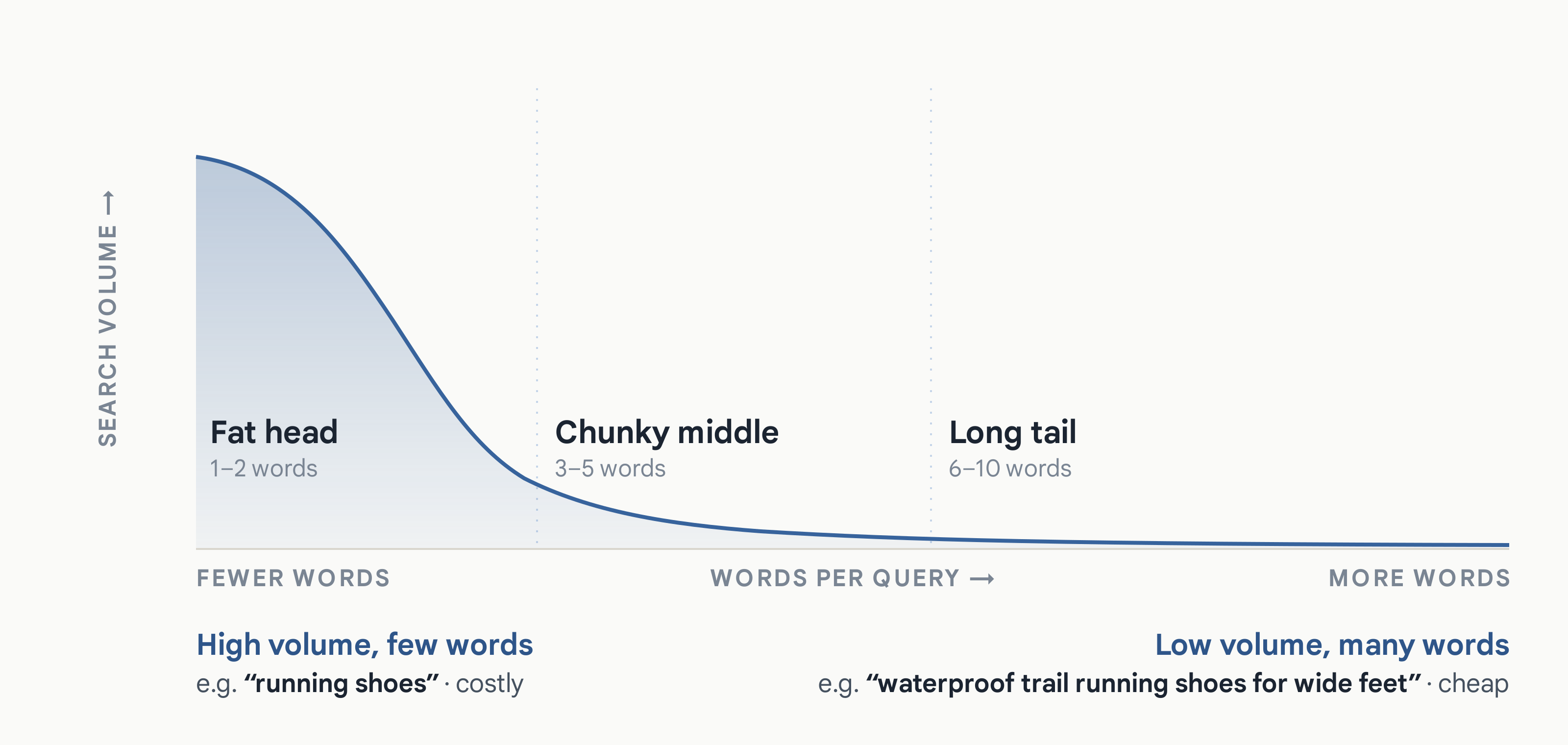
The rough mental model everybody used to organize that list looked like this. Fat head terms with high volume and vague intent. The chunky middle with slightly more specific queries. And then the long tail, low volume, three or more words.
The standard advice was to focus more on the middle and the tail, because the head was expensive and the tail converted better at a lower cost per click.
And underneath all of it was the 80/20 rule. In almost every niche, a small fraction of your keywords drives the overwhelming majority of your conversions. Sometimes 1 to 5% of keywords producing 95% of the business.
So the real job was never building the list. It was finding the small number of terms inside it that mattered and making sure your ads were high on the page for those terms.
The tool was a way to get a seed list. You’d use it to generate enough plausible terms to start a campaign, you’d launch, and then the actual research happened in the search terms report. The real queries, the ones that actually converted. That’s where you found out what people actually searched and which of those terms were worth anything. The gold, as one of my colleagues used to call it.
Keyword Planner got you to the starting line. But the campaign did the research.
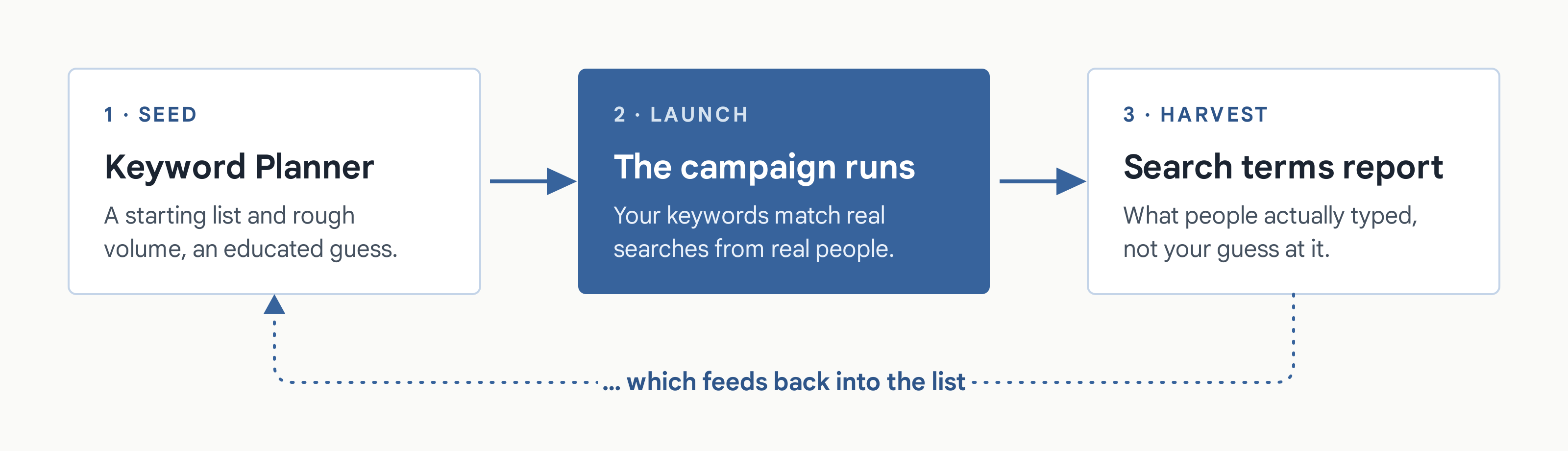
That loop is still how it works. A lot of what follows might sound like keyword research is dead. It isn’t. But one half of that loop has changed.
What the tool actually tells you
Let’s go through what Keyword Planner reports, because the definitions matter more than people assume and a few of them are commonly misread.
Average monthly searches
“The average number of times people have searched for a keyword and its close variants based on the month range as well as the location and Search Network settings you selected… By default, the number of searches for the term (regardless of language) is averaged over a 12-month period.”
Note that phrase, and its close variants. The number you’re looking at is already a bundle, not a count of one string.
That volume is exact match only
“Historical stats like average monthly searches are only shown for exact matches… you’ll be shown the same exact match stats whether you use a broad, phrase, or exact match type with ‘dark chocolate’.”
So the volume number doesn’t change with match type. Which is a bit surprising, because the intuition is that broad match should have a bigger addressable number than exact. But you get one figure.
The volumes are also rounded. That’s why, when you pull ideas for several locations, the numbers don’t add up the way you’d expect.
Competition
“The number of advertisers that showed on each keyword relative to all keywords across Google… In the Competition column, you can see whether the competition for a keyword is low, medium, or high.”
That number is measuring advertiser density. More advertisers usually does mean a more expensive keyword, so it’s not unrelated to cost. But it’s not a cost figure, and it’s not a difficulty score either. If you want to know what a keyword costs, the top of page bid columns can give you an approximate number, though in my experience those are often off too.
Bid ranges
“The lower range bid, an approximation of the 20th percentile, that advertisers have historically paid for a keyword’s top of page bid… The higher range bid [is] an approximation of the 80th percentile.”
That’s the most useful cost signal in the tool, and it’s a range for a reason. What you actually pay also depends on your own ad quality, so the range is telling you what the market has been paying, not what it’ll cost you.
Two columns you probably ignore
Two columns that get overlooked.
Organic impression share is the percentage of times a listing from your website showed up in web searches for that keyword. That tells you where you’re already visible without paying for it, which is useful when you’re deciding what to bid on.
Ad impression share in Keyword Planner is your impressions divided by the total searches for that exact keyword, in the location and network you’re targeting, over the last calendar month. And it isn’t the same metric as the impression share columns in your campaign reports. Those are based on the impressions you were eligible to receive. This one is based on total search volume for the keyword, whether you were eligible or not.
A dash in that column means there isn’t enough data to calculate it.
Forecasts, and where they break
“Your forecasted impressions take your bid, budget, seasonality, and historical ad quality into account to estimate future performance.” … “Keep in mind that forecasts take bid, budget, seasonality, and other factors into account, while historical metrics do not.”
Forecasts refresh daily and run off the last seven to ten days. So one half of this tool is looking backwards at what happened, and the other half is modeling what might happen to you specifically.
And then there are three caveats in Google’s documentation that land directly on the people reading this.
A new account. “Your forecasts are based on historical average data for all advertisers because there isn’t a sufficient amount of data about your particular business yet.” So your very first forecast, on a brand new account, is close to a generic industry guess with your name on it.
A small geographic region. “You can expect results to be less accurate if you’re targeting a small geographic location, simply because there is less data on which to base predictions.” That’s most local service businesses. Most contractors.
Similar keywords in the plan. “Keyword Planner tries to predict how traffic will be divided between the overlapping terms. As a result, your forecasts will be less accurate.” And a well-built keyword list is full of similar keywords.
Stack those three and you get a clear picture. Forecasts are least reliable exactly when people lean on them hardest: a new account, a small local area, and a list of related terms.
Use them for rough scale, but I wouldn’t spend too much time with them. Two things are worth a look: roughly how many monthly searches there are for these keywords, and approximately what a click costs. That gives you a general sense of the market. You won’t find out the reality until you launch and let it run for a few weeks.
Google’s advice is fighting Google’s system
Under “think like your customers,” Google tells you to describe how customers think of your product or service category. Their example of doing it right is “hiking boots.” And then what not to do: don’t anticipate actual search queries that potential customers might enter, because keywords that are too specific can be limiting. The example they give is “what are the best hiking boots?”
Further down the same page, they warn against being too specific.
| Too general | The right amount of detail | Too specific |
|---|---|---|
| “wedding” | “wedding venue” | “wedding venues for small weddings” |
| “tasty” | “kids recipes” | “kids recipes under 10 minutes” |
All three of those “too specific” examples are exactly the kind of thing people type now. A full question. A qualified request. A sentence rather than a category.
So Google is telling you to research at the category level, while simultaneously building a matching system designed to handle conversational sentences, and reporting that queries are getting three times longer.
From their side that’s consistent. Keep the research broad and let the matching handle the specific queries. The trouble is the page doesn’t say that, so it reads like advice to avoid specificity rather than advice to leave specificity to the system.
There’s a related line on the basic tips page.
“You don’t have to add every variant of every keyword, as all match types can capture traffic from closely related variations of your keywords.”
That’s what SKAGs and STAGs were for. A tightly themed ad group, an ad whose headline echoed the keyword, and back then Google would bold the matching words in your ad on the results page. So your ad visibly matched what the person just typed. That drove clickthrough rate, which drove Quality Score, which drove your cost.
Google is now saying you don’t need to do that, in a single line, on a tips page.
What survives from the old method
So let me come back to that 2020 article.
Most of what I wrote about process is obsolete. The part about building comprehensive lists, the volume thresholds I used as rules of thumb, the long tail as a strategy. All of that assumed a system where your list defined your reach.
But a few sections hold up, and one of them holds up better now than when I wrote it.
I made a distinction between what I called explicit solution keywords and problem, symptom or pain keywords.
| Names the solution | Describes the problem, symptom, or pain |
|---|---|
| San Jose plumber | “my pipes burst and my house is flooded” |
| anti-ransomware software | “my computer is telling me all my files are encrypted and I need to send money to a Bitcoin address” |
| ecommerce software | “how can I sell my homemade cookies online” |
Look at the shape of that second column. Longer. Phrased as a situation rather than a product. Written the way somebody actually talks about their problem rather than the way a vendor names a category.
That’s structurally identical to how people phrase conversational queries. I was describing the shape of modern search in 2020 without realizing it, because that’s just how people describe problems when they aren’t using industry vocabulary.
Which means that exercise is more valuable now than it was then. Thinking in problems instead of product categories is how you find the language the system will use to match you.
The funnel
The other thing that holds up is sorting keywords by where somebody is in their decision.
Browse at the top. General information, looking at what’s out there. Compare in the middle, weighing options, reviews and versus queries. Purchase at the bottom, brand and product names, buy and trial and pricing.
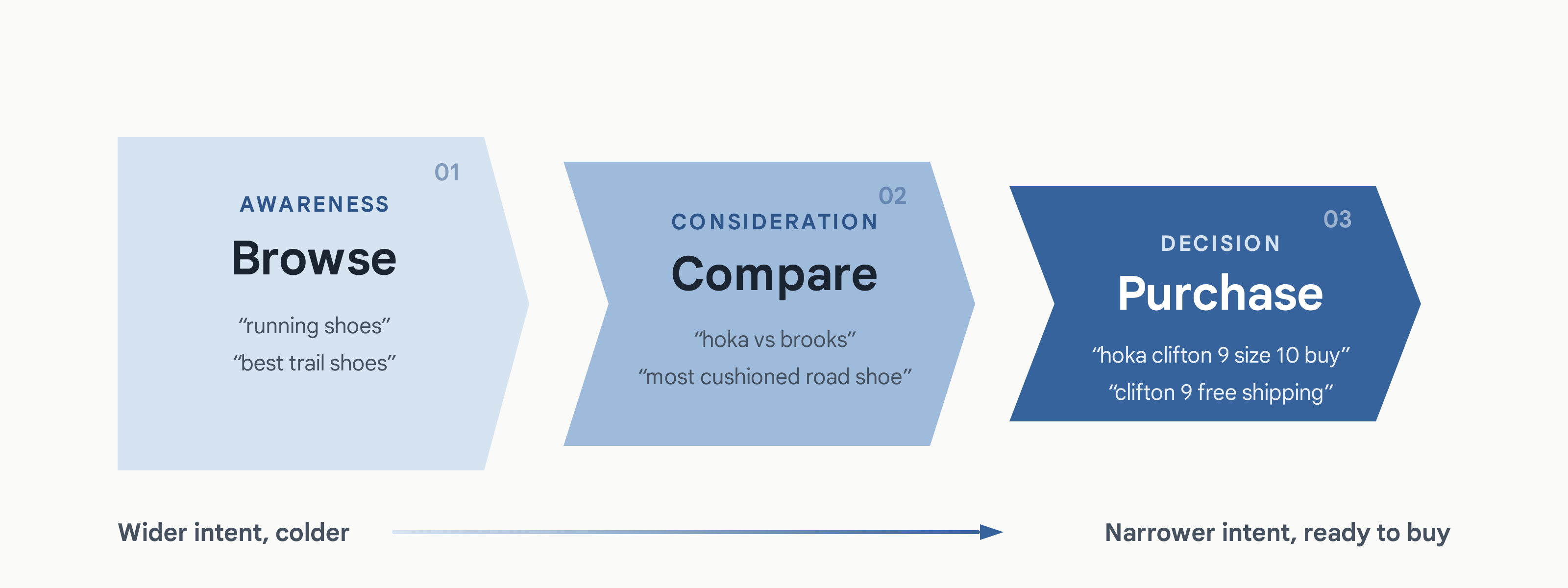
That one survives because it isn’t a claim about how Google matches anything. It’s a claim about the person. And people still move through a decision the same way they always did, no matter how the queries get phrased.
Two caveats, and I wrote both of them at the time. The funnel is an artificial construct. Marketers invented it to explain something messier than it really is. People don’t move through it in order. Plenty of them do their research offline or through referrals and drop straight in to buy off a browse keyword.
And the purchase-intent terms tend to look like your best converters mostly because they’re the last click. The decision that actually led there may have been a browse query weeks earlier. That’s an attribution problem.
Classifying intent
One more from that piece. Google’s search quality rater guidelines classify queries by what the person is trying to do. Back in 2009 it was three buckets: action, information and navigation. Do, know, go.
The current version, from September 2025, has four. Know, and a subset called Know Simple for queries that want one specific fact. Do. Website. And visit-in-person.
The scheme got more granular, but the idea holds. Somebody is trying to do something, know something, reach a specific site, or go somewhere physical. That’s a rough sort but it’s still a useful one.
What doesn’t survive
What doesn’t survive is the long tail as a strategy.
In 2020 and long before that, working the tail was a choice you made. Lower volume, cheaper clicks, less competition, higher conversion rates. You went there deliberately because the head was expensive.
Now the tail is where the volume is heading, because queries keep getting longer. But you can’t bid on it directly. A keyword maxes out at ten words, and every word someone adds multiplies the number of possible phrasings that you can’t anticipate.
So the tail has become the main event, and it’s unreachable by keyword. And that’s the best argument I’ve seen for broad match. You can’t write down the queries anymore, so you need something that matches on meaning instead.
So what is research for now
Which brings us back to the question at the top.
It’s not building an exhaustive list. That stopped being possible, and Google stopped asking for it.
Four things it still does.
- Sizing demand. Is there enough search volume in this market to build on at all. Rough scale, not precision. This is the one job where the volume numbers genuinely earn their place, and it’s what I used them for even back when I trusted them least.
- Finding language. How do people describe this problem when they aren’t using your vocabulary. That feeds your ad copy and your landing page, and both of those are now inputs into matching.
- Identifying themes. Not a list, a set of groups. Which becomes your account structure.
- Finding the terms worth protecting. Exact match still gets priority when a search is identical to your keyword. So there are usually a handful of terms worth protecting that way, the ones you already know convert.
You’re no longer writing down the queries you want. You’re describing your business well enough that the system can match you to queries you’ll never see and couldn’t have written.
Which makes the quality of your inputs the entire game. Your keywords are one signal. Your landing page is another. The other keywords in your ad group are a third. All three feed the same decision.
One last thing, because it comes up constantly right now.
This is a reasonable place to use an LLM, but be specific about what it’s good for. Expansion is the job. Generating the problem-shaped phrasings, the situations, the ways somebody describes a symptom instead of a product. That’s the column that was always hardest to brainstorm, and a language model is genuinely good at it.
What it can’t do is tell you search volume, competition or cost. Ask it and it’ll produce numbers that look right and have no source behind them. That part is Keyword Planner’s job.
So: the model expands, the Planner validates, the campaign harvests. Three steps, and none of them can do the others’ work.
And a caution that follows from everything else here. Don’t take those expansions and load them in as keywords. That’s the exhaustive list again, and Google’s own guidance says you don’t need it. Use them to understand how people phrase the problem. That language belongs in your ad copy and on your landing page, both of which are inputs into matching now. A handful might become keywords. Most of them shouldn’t.